See the forms you've submitted on mobile
The mobile app now lists every form you have submitted, so you can check what you sent and what you answered.
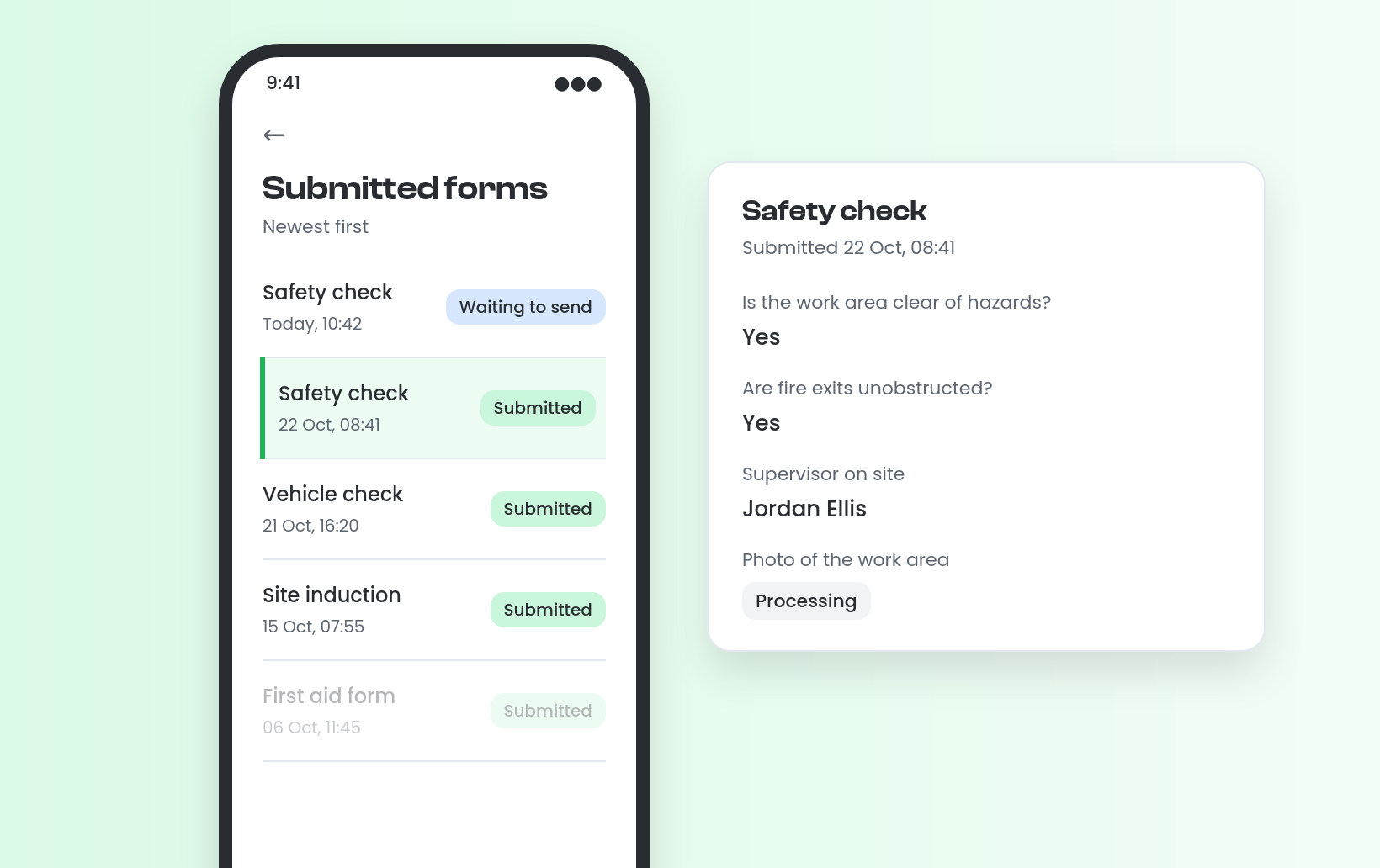
The mobile app now shows a list of every form you have submitted, newest first, with the form name, the date and time and the status. Tap any submission to read your answers exactly as you gave them, even if the form has been changed since.
A form you complete without signal appears straight away as Waiting to send, and moves into your submitted list once it syncs. Attachments that are still being checked show as Processing until they are ready.
For example, a worker who completed a site specific risk assessment can later open their submitted forms to confirm it was done.
Update to the latest version of the mobile app to see your submitted forms.


Stevie is the Customer Advocate here at Visibly with a knack for transforming even the most tangled training matrix into clean, actionable data in the platform. With years of industry expertise under her belt, when she’s not guiding teams through the product, she might be watching Wicked for the tenth time (and singing every word of that or Stormzy)!